
What Makes an LMS Mobile App Truly Effective? 10 Must-Haves for Learning That Works Anywhere
We cover the 10 essential elements that make an LMS mobile app truly effective, from content delivery and course management to security, UX, and offline access. Discover how to make on-the-go learning seamless and impactful.

July 27, 2026
We live in a mobile-first world. We access information, communicate, and complete tasks from the little device in our pocket. Learning is no exception. We’ve shifted beyond the use of textbooks, computers, and in-person lessons. Mobile learning, also called mlearning, bridges the gap between convenience and access to essential courses.
The numbers reflect the growth in popularity; according to eLearning Industry, “The mobile learning market has attained a 30.12% CAGR, with a staggering value of $155.81 billion in 2026”.
An LMS mobile app is no longer a “nice to have”; it’s a necessity. Especially useful for industries with workforces on-the-go, like hospitality, healthcare, and manufacturing, mobile learning directly enables them to complete training away from a desktop.
LMS Mobile App Development: Headless Solutions
Not all mobile learning apps deliver. Some platforms are unresponsive, difficult to navigate, or missing critical features that are available on desktop. Instead of enhancing training, they create a disjointed, frustrating experience.
Many teams feel trapped by out-of-the-box LMS options, so they turn to headless customizations. A headless LMS is a system that separates the front and back end of a learning management system, then reconnects them through an API. This means you can work on either side of the platform without changing the other.
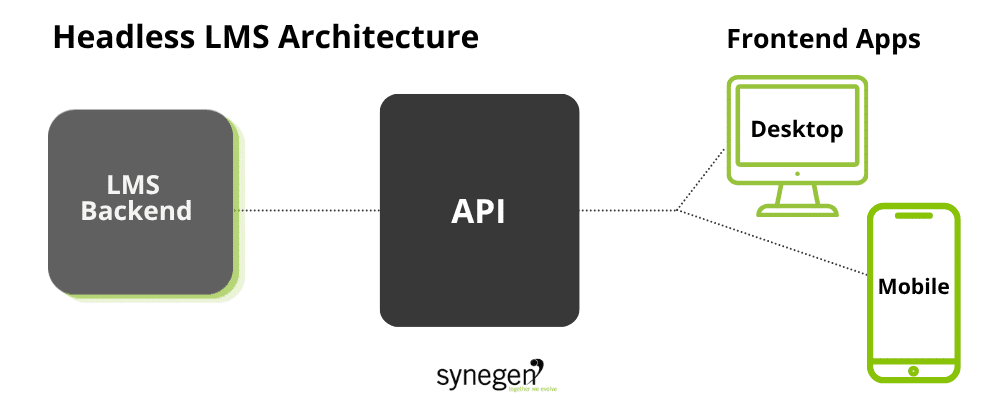
A headless system might not be necessary for every team. But if you’re looking to break the mold and manage mobile learning your way, it’s a strong consideration.
If you’re investing in a mobile learning platform, read on. With over 25 years of experience in custom software and mobile app development, we’ve pooled our expertise and advice across ten key focus areas. Each one is critical to delivering a mobile experience that actually supports learning, rather than interrupting it.
1. Learning Experience: Engaging and Effective Content Delivery
User experience is everything. If a learner has a difficult time accessing and navigating their courses, learning doesn’t stick, and they’re less likely to access learning on their own.
Mobile learning content and mobility go hand in hand. Short, focused, and interactive modules are more effective than long reading passages or dense video lectures. Learners engage better with multimedia elements including:
- Videos
- Audio clips
- Animated explanations
Not only are these content formats compelling, but they can also be consumed in short timeframes. This improves learner engagement and outcomes.
The best mlearning apps also support adaptive pathways, adjusting content based on user behavior and progress. Personalized progress tracking keeps learners oriented, while interactive elements such as quizzes, exercises, or scenarios help reinforce concepts.
2. Content Management: Flexibility and Quality Control
A strong back end and content management system separate decent apps from great ones. They easily deliver updated content, create high-quality media, and use modular delivery to organize courses. Additionally, this setup enables course creators to quickly make changes or add new material without waiting on a full system release.
This flexibility is especially useful for keeping compliance and operational training up to date.
Don’t just take our word for it. CraftPro by The National Center for Construction Education (NCCER) is an LMS mobile app developed by Synegen. After reviewing their greatest challenges and needs, we helped NCCER shift to a cloud-hosted learning model, enabling flexibility and control.
To help NCCER become more agile and responsive to industry shifts, we expanded their quiz module functionality by building custom assessments and scoring metrics. Next, we introduced platform integrations to Shopify and Salesforce to better-equip the LMS. Now, CraftPro learners access role-specific training across 45 crafts and 25 related areas of training from industry experts; in fact, they currently issue over 300,000 tests each month!
Apps that support offline access and smart caching allow learners to continue working even when Wi-Fi is spotty or unavailable, syncing progress once connectivity resumes. That kind of seamless access is crucial for environments where internet connections aren’t always guaranteed.
3. Course Management: Structure and Progression
All learners benefit from structure, even in a mobile environment.
Clear course pathways with milestones and checkpoints guide learners while building momentum. Even more, features like automated reminders and deadlines help ensure learners don’t lose track of where they are or what’s due.
Visuals are key. An elearning app can further improve user experiences with:
- Progress dashboards
- Downloadable certificates
- Milestone badges to showcase achievements
For administrators, the ability to manage enrollment, whether manually or through bulk uploads, and assign courses or bundles tailored to specific roles is a necessity for maintaining an organized learning program.
4. Learner Support: Motivation and Assistance
The right support system makes all the difference.
Whether it’s answering a content-related question, troubleshooting access issues, or simply needing a nudge, the best LMS mobile apps include built-in assistance options. These capabilities suit many contexts, including:
- In-app messaging
- AI chatbots
- Live chat support
In addition, many platforms incorporate social features, like peer discussion boards or messaging, to create a sense of community. This is particularly useful for enterprise businesses with teams across shifts and geographic locations.
Onboarding flows, tutorials, and contextual tips also go a long way in helping users get the most out of their mobile learning experience, especially for those less comfortable with technology.
5. Security and Data Management: Protecting Learners and Institutions
Security can’t be an afterthought.
Mobile learning platforms should meet industry standards for data protection, whether that’s GDPR in Europe, COPPA for minors in the US, or FERPA in American educational settings. Your businesses must encrypt and store data securely, and establish clear privacy policies that explain how learner information is used.
If you aren’t confident in your data use and protection policies already, a custom software development team and integration expert like Synegen can help your team organize data.
Additionally, role-based access controls help ensure that learners, managers, and administrators only see what’s relevant to their role. The most trustworthy apps also make data use transparent and offer clear options for user consent and data control.
6. Gamification: Driving Engagement Without Distraction
Gamification is an often overlooked LMS mobile app technology.
When set and managed properly, games are a powerful motivator; but they must be aligned with learning goals, not just activity tracking. Points, badges, and streaks can encourage learners to return and stay consistent, while leaderboards can introduce healthy competition, especially among teams.
However, overuse or poor implementation can lead to distraction or even burnout. The most effective apps use gamification to reinforce learning outcomes rather than replace them. Plus, they can offer optional personal challenges or team-based goals that tie directly to skill progression or performance improvement.
7. Authentication and User Management: Easy, Secure Access
The mobile learning experience begins at login.
Flexible authentication options, such as email and password, social login, or biometric authentication, make sign-in simple and secure. A smooth process decreases the likelihood of learners dropping off without getting past the login screen.
For enterprise organizations, Single Sign-On (SSO) integrations can help ensure a seamless experience across tools, while multi-factor authentication adds another layer of security.
Easy-to-process account recovery also improves both user access and experience, helping them re-access their learning sooner. On the backend, a custom developer can build a platform that helps administrators manage users, assign roles, and enforce permissions. This way, learners see what’s intended only for them.
8. Activity Management: Tracking and Feedback
Like traditional learning, mobile learning needs to have direct impacts on learners, goals, and business outcomes. Understanding how the platform and specific modules, learning paths, and courses garner the most results is imperative.
The best platforms track user activity and offer immediate, meaningful feedback. Real-time analytics help learners and instructors monitor progress, while automated grading provides quick turnarounds for quiz and assessment results.
Integrating calendars and notifications can help learners manage deadlines and sessions. Even more, features like reflection prompts or self-assessments allow learners to consolidate their understanding and take ownership of their development.
9. UI/UX Design: Intuitive, Accessible, and Responsive
Design can make or break a mobile learning experience. A truly mobile-first design approach:
- Prioritizes ease of use, ensuring the interface works well within thumb’s reach
- Uses large and readable fonts
- Minimizes the number of steps to complete an action
Your LMS mobile app should also prioritize accessibility, with features including:
- Screen reader support
- Customizable font sizes
- High-contrast modes
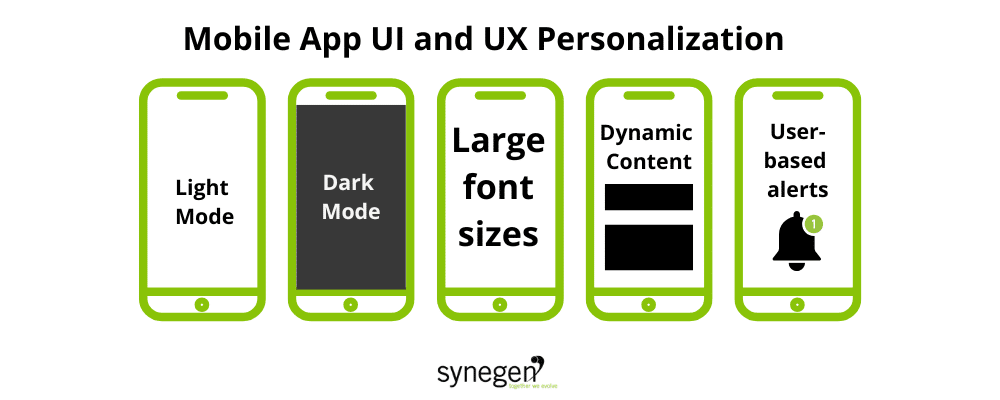
Personalization features help create a comfortable, user-friendly experience. Whichever accommodation and platform customizations you choose, a custom developer can help you ensure everything visually aligns with your brand, across desktop and mobile applications.
10. System Performance: Speed, Stability, and Scalability
Inherently, none of the work you put into your LMS mobile app and user experiences matters if the app crashes, lags, or slows down under heavy usage.
A robust backend infrastructure enables quick load times and platform access, even during peak usage or in areas with spotty connectivity. Just like ongoing maintenance for a car, an mlearning app requires:
- System performance monitoring
- Regular updates
- Bug fixes
Constant surveillance and actioning maintenance tasks ensures your mobile app reliably delivers training at all times.
Choosing the Right LMS Mobile App
An effective mobile learning app is more than just a smaller version of your desktop LMS. It’s a fully functional learning environment designed for flexibility, engagement, and results.
By focusing on these ten areas, organizations can make smarter decisions about which solutions will truly support learning on the go, and which ones will fall short. Whether your learners are in an office, on a factory floor, or out in the field, they deserve a mobile learning experience that’s just as powerful as any other.
Want to revamp or build a new mobile LMS app? Synegen is here to help. Our team of technology and business consulting experts has helped enterprise businesses reach their goals for over 25 years.
Book an introductory call with our team and see how Synegen-built technology can transform learning today!
LMS Mobile App FAQs
1. What should the design and user experience of an LMS mobile app look like?
A mobile-first design prioritizes ease of use: interfaces built for thumb reach, large readable fonts, and minimal steps to complete an action. Accessibility features make learning easier to digest; these capabilities include:
- Screen reader support
- Adjustable font sizes
- High-contrast modes
Finally, personalization options like dark mode accommodate learners while staying visually consistent with the brand across devices.
2. Why does app performance matter so much for mobile learning?
No feature or upgrade matters if the app isn’t reliable. An LMS mobile app needs to load quickly, respond smoothly, and stay online – even during peak usage or when users experience weak connectivity. Lagging or app crashes undermine every other investment across the platform, like content and design.
Join Beyond The Code: Synegen's Technology Newsletter
Related Content