How Custom LMS Software Transforms Learning Programs for Growing Workforces
As businesses grow, the challenge of offering engaging learning experiences compounds. Custom LMS software can help leverage technology stacks as learning needs scale.

May 18, 2026
After a lengthy hiring process, well-structured employee onboarding and training are essential.
As organizations expand, scaling learning programs becomes more challenging. With the influx of new employees, onboarding must scale quickly to meet demand. Managers, now overseeing larger teams, have less time to provide individualized development opportunities. Simultaneously, employees often struggle with a fragmented learning experience as they navigate multiple platforms and systems.
To address these challenges, it’s crucial to streamline training processes and empower employees to take control of their own learning journeys. In this article, we’ll discuss key considerations your team should keep in mind to overcome these hurdles and ensure a seamless, scalable learning environment.
What is Custom LMS Software?
Custom LMS software is a digital platform that extends traditional learning. Bespoke platforms often have:
- Tailored security protocols
- Personalized learning paths
- Unique reports and filters
- Cross-platform connections
- Data synchronization
When compliance is a priority, like medical license renewals or government-regulated data protection, businesses can customize their LMS to ensure all requirements are met.
For growing businesses, a custom software flexes and scales when you do, making it easier to train and progress employees your way. According to Lorman Education Services, 92% of employees polled “say well-planned training programs positively impact their job engagement.” Additionally, “84% of employees say learning gives their work more purpose.”
An internal educational program and opportunities to upskill are more than simply meeting needs. It’s a true care for your employees and company culture at work. When employees feel truly empowered, job performance, productivity, and retention improve. A custom-built LMS helps make business growth easier to manage.
Why Scaling Gets Complicated
When organizations scale quickly, they often face three key challenges:
1. Rapid growth – without the proper internal foundation. Hiring en masse, without clear job roles, expectations, and training, is a recipe for chaos. This highlights the necessity for streamlined internal structures, efficient training, and smooth onboarding.
2. Personalized development. Managers can get stretched thin as teams grow. This leads to reduced individualized development opportunities for every employee.
3. Resource allocation. As organizations expand, so does complexity. Aligning employees with the right learning tools and resources can be a challenge when they have to navigate a web of platforms and systems.
Addressing these challenges is necessary because:
- Without streamlined processes, employees can face inconsistent training, making it harder to feel confident and productive in their roles. If growth outpaces the onboarding process, there can be gaps in skills and knowledge.
- A lack of individualized attention can lead to disengagement. Giving employees autonomy to choose their learning paths ensures they can focus on what matters most to their professional goals.
- A fragmented learning experience can cause employees to feel overwhelmed by the complexity of accessing and using different systems.
Overcoming these challenges requires a solid technology foundation that supports your learning strategy as it scales.
That’s why Synegen is a trusted partner for enterprise businesses across North America. Here’s Synegen in action. We partnered with Genesis HealthCare, a growing care provider facing these exact challenges: disconnected tools, low adoption, and a fragmented learning experience. They needed a reliable way to efficiently onboard 15,000 new employees a year, and keep their team of 60,000 compliant with recertification training, orientation programs, new or updated systems training, new operational programs, and compliance reporting.
Synegen developed a custom LMS platform called vitalLearn, an eLearning platform for clinical workers. With easy-to-follow learning pathways, dynamic content, and accessible elective learning, Genesis saw a surge in active users and course completions.
Karen Stambaugh, Director of eLearning Technology Services at Genesis, shares, “In our business, there’s always an opportunity for our employees to learn and grow, and vitalLearn is there to support their growth today and into the future…Synegen continues to provide unique solutions-based ideas to help us meet these needs while staying within budget constraints.“
If your organization’s growth feels out of control, Synegen can help. Schedule a free LMS right-fit evaluation with our experts to determine the best customizations for your team.
As you weigh the necessity of a custom LMS for your team, here are a few key considerations to help ensure your technology scales with your learning programs, supports learner engagement, provides clarity for managers, and promotes long-term success.

Designing a Flexible Learning Foundation
When organizations scale rapidly, they often run into the same growing pains: juggling disconnected systems, time-consuming manual tasks, and outdated data. To avoid this, you need a learning foundation built on three key pillars:
1. Connecting Systems
As organizations scale, they often rely on multiple platforms to manage various functions. Without strong system integrations and data syncs, however, productivity and communication suffer. Without this connectivity, the complexity of managing multiple platforms can quickly overwhelm the organization, making it difficult to maintain accurate and consistent information.
But connectivity alone isn’t enough. Another key consideration is ensuring these connected tools are aligned around a single source of truth. This consolidates data from multiple platforms into a centralized location, ensuring all information remains consistent, accurate, and up-to-date across the organization. While each platform still plays an important role in the learning ecosystem, they must all feed into this unified source to eliminate discrepancies and maintain reliability, supporting informed decision-making at every level.
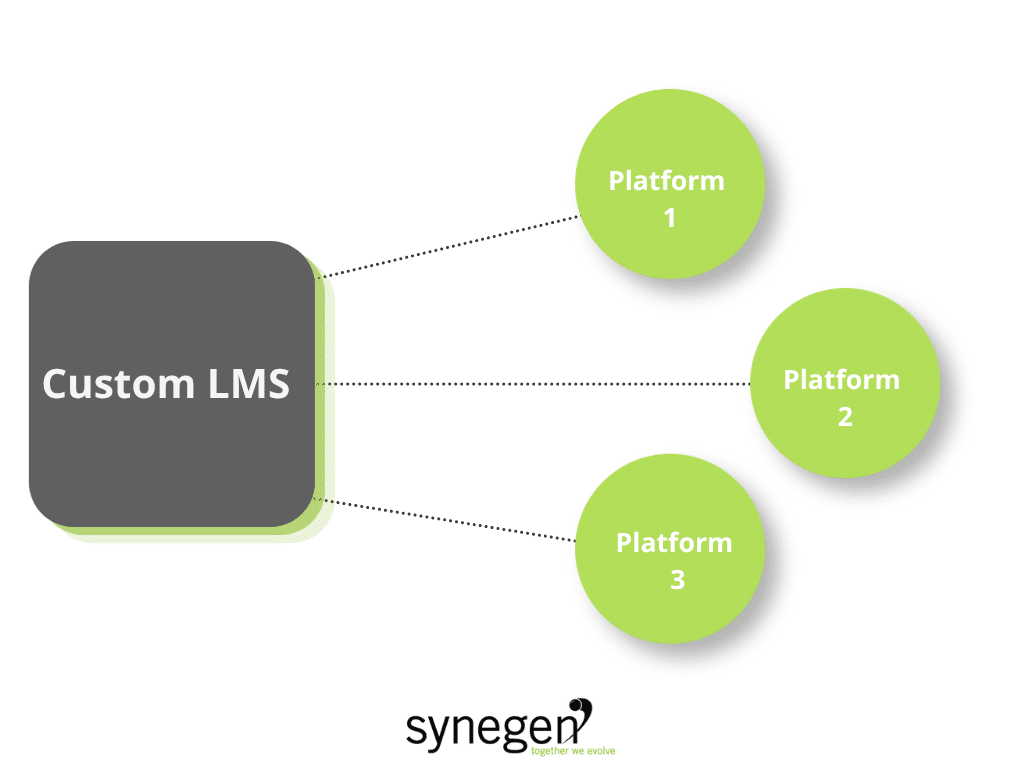
Positioning your custom learning management system at the center of your employee-related ecosystem considerably improves experiences for both employees and management. Learners can access relevant courses, and managers can stay on top of requirements for their team.
Platforms with strong API capabilities, like Totara’s open-source solutions, offer even more control. Open-source platforms let you specify exactly how your systems connect, what information is shared, the direction in which information is sent, and when data syncs.
2. Automating Routine Tasks
Highly repetitive tasks, such as tracking course enrollments and completions, generating reports, and recording data, are time and resource-intensive. Rather than chasing information or manually managing users, your team can put valuable effort into learning and development activities.
Examples of automated tasks include:
- Reminders and notifications
- Course pathways and lesson enrollment by role
- Grouping and cohorts
- Report generation
Automation frees teams to focus on what matters most: analyzing program impact and making strategic adjustments. Plus, automated processes enable organizations to scale without adding significant manual effort, keeping operations productive and aligned with growth goals.
3. Promoting Real-Time Data Flow
Reporting should be instant and actionable. By 1.) connecting your systems and 2.) automating the transfer of information to and from your source of truth and other tools, you gain up-to-date tracking of learner activity, giving your team the insights they need to adjust quickly.
Real-time data flow is essential for scalability. Without it, manually tracking learner progress becomes impossible. With the right technology, you can grow without losing oversight or responsiveness, keeping your learning programs efficient and adaptable.
How a Custom LMS Unifies Learning Experiences
As your learning-related technology stack expands and your team grows, day-to-day user experiences can get lost in the complexity. But it’s these granular experiences that are the most important. A custom LMS that employees don’t actually enjoy using is a tremendous hit for your business’s ROI.
Employees who can’t see the value of learning, or can’t easily access learning, are more likely to move on, leaving you with a whittling staff and unused LMS.
To keep things cohesive:
Centralize Access
With so many platforms and resources, it can be overwhelming for learners to remember where to find what they need. Instead of forcing them to log into multiple systems, provide a single access point where all training materials are available.
Use a unified front-end interface or portal that layers over your existing tools and delivers a consistent user experience.
Simplify Navigation
Searching through multiple platforms can be time-consuming for learners. Implement intelligent search and tagging systems to help learners easily find the right content in a fraction of the time. Content can be easily found, whether it’s internal training or external resources like LinkedIn Learning.
Maintain Branding and Structure
Consistent visuals, color schemes, and content formats help learners feel grounded and confident as they navigate through training. Even if they’re technically viewing content from another learning tool, they should still feel as though they’re within the same central learning portal.
How Custom LMS Software Empower Employees to Own Their Learning
Managers become spread thin as teams grow. With more learners to track and less time to provide personalized attention, ensuring employees receive the support they need to succeed becomes a challenge.
Custom LMS software gives employees the autonomy to choose their own learning paths, helping them access development opportunities that resonate most with their growth goals. This way, learners have more control over their progression.
Here are two ways to support employee autonomy:
1. Personalized learning pathways. A custom LMS can improve access to role-specific learning, enabling users to enroll in learning tracks based on their goals, roles, or performance data.
2. Progression tracking. A bespoke LMS platform can outfit users with dashboards that automatically update and display progress within the central portal. Learners will always know where they stand. Additionally, you can introduce badging, so users can show off their accomplishments. Learner progress should reflect updates across all tools and platforms. keeping everyone aligned.
Equip Managers with Visibility and Insights
Measuring the impact and effectiveness of your learning programs is crucial. Custom LMS platforms unlock stronger insights than ordinary systems. This information can help managers identify knowledge gaps, opportunities for training, and
With real-time tracking, managers can take fuller control over employee progress while reducing oversights. For learning programs to be effective, managers need real-time visibility into employee progress. Just as seamless progress tracking benefits learners, it simplifies oversight for managers.
Here are two tools to implement:
1. Real-Time Dashboards. Custom LMS platforms expand traditional reporting, giving administrators clearer views into employee progress, course completions, and job performance. Just like learners, managers should have everything they need in one centralized dashboard.
2. Automated Nudges. The best LMS platforms help managers identify when it’s time to give certain employees more specialized guidance. Use automated notifications to send reminders or alerts when progress stalls or milestones are achieved.
Engaging Learners with a Custom LMS Software
Scaling your business’s internal learning programs isn’t just a technical exercise; it’s a strategic one. The goal isn’t to do more, it’s to do better at scale. Investing in a custom LMS, which can heighten cross-platform integrations, improve user experiences, and better equip users with the tools they need, makes it easier to create programs that grow with your workforce – without sacrificing engagement or effectiveness.
Can your current learning technology stack effectively support your organization’s growth? Synegen is an expert in custom software development and business consulting for enterprise businesses. Our team of experts can help you determine if it’s time to refine your learning workflows. Book a call with us today, and see how Synegen can streamline your LMS platform!
Custom LMS Software FAQs
1. How do I manage complex learning requirements when using an LMS?
A custom LMS can help you manage complex learning requirements through automation. Instead of manually building and assigning courses, the LMS can automatically enroll learners in course pathways and lessons based on job titles, certification requirements, and role requirements.
Rather than manually collecting and reviewing data, your LMS can automate:
- Reminders and nudges
- Actions, such as updates to user development
- Course enrollment and progression tracking
- Certificate expirations
- Report generation
With everything at their fingertips, managers will know who’s on top of their learning, who needs remedial lessons, and who can benefit from personalized training sessions. Learners can access the courses that matter to them, and managers have an easier time showing up for their team, improving engagement and learning outcomes.
2. How do I measure educational outcomes with an LMS?
Measuring educational outcomes boils down to two necessities: 1) an LMS with wide reporting capabilities and 2) tracking the right metrics and analytics.
A custom LMS developer can help you reap the most from your platform, building custom system integrations, data synchronization, and bespoke reports and filters. This makes it easier to see the impact of learning in the LMS and how it translates to the workplace.
The right metrics to track stem from the goals you set for your team and business. For example, if you want to improve workplace compliance, tracking course enrollment and completion is a must.
Need help getting started? Here’s 35 can’t-miss LMS analytics metrics your team needs to track!
3. How much does it cost to build a custom LMS?
Custom LMS development pricing depends on a variety of factors, including:
- The complexity of the project
- The software feature set
- Platform scalability
- Where your custom software development team is located
- The level of support and aftercare
- Cross-platform integrations
Remember: Overwhelmingly, the cost of custom LMS development is much higher than a SaaS or off-the-shelf solution, but SaaS products generally cost more as businesses scale due to software licensing fees and purchasing an expanded feature set.
Book a call with Synegen to get a personalized quote for custom LMS development!
Beyond the Code Newsletter
Where technology moves beyond the build—to real business impact.
Every month, we break down how integrations, automation, and real-time data flow can solve messy business problems and drive actual growth.
Related Content