
5 Costly Data Integration Challenges (and How to Overcome Them)
Data integration challenges directly impact how businesses scale, adapt, and compete. Uncover the five most common system integration mistakes and how the support of a custom developer can help avoid them.

June 29, 2026
Data integration challenges plague enterprise businesses. Despite system integration being the second-highest buying consideration for teams evaluating finance, engineering, R&D, HR, and operations software, too many companies treat the software integration process as a simple IT checklist.
When businesses don’t approach enterprise software integration strategically, the consequences are real: poor adoption, broken workflows, and underwhelming ROI.
Keep reading, and we’ll cover five of the most common data integration challenges that derail organizations, software integration solutions, and all the ways data integration services from a custom software development team can help you get it right.
1. Treating Enterprise Software Integration as a Technical Decision Alone
One of the most damaging integration challenges occurs when business stakeholders step away from the process after initial planning. This creates a serious disconnect, leaving IT teams to execute without adequate operational context.
This results in technical teams designing integration logic around system capabilities rather than actual data flows and business workflows. These systems might function properly, but they fail to solve the deeper business problems they were intended to address.
Not only can a custom software developer, like Synegen, build bespoke integrations and protocols, but they can also help organize business and technical alignment. An integration expert can ensure key team members understand how the integration works, what business goals it impacts, and who is responsible for what going forward.
How to Address Operational Gaps
Lead With Business-Driven Data Models
Involve key stakeholders in discovery workshops. A custom developer can help surface real-world data flows and use cases before technical scoping begins. When technical teams understand not just what data moves but why, they can better manage integration logic that maps to operational realities rather than assumptions.
Establish Cross-Departmental Ownership
Build cross-functional teams where business and IT leaders share equal accountability across the full integration lifecycle, from design through refinement. This ensures evolving workflows don’t create gaps between intent and execution.
Schedule Ongoing Alignment Sessions
A kickoff meeting is not enough. Regular business-IT syncs throughout the project ensure integration logic, data flows, and process designs stay current as needs shift.
2. Confusing Connectivity with Automation
A critical and costly misconception in the software integration process is assuming that setting a connection is the same as process automation. Connecting tools is a necessary foundation, but this alone does not make tasks happen automatically.
Automation requires additional setup. This includes defining triggers, building conditional logic (such as if/then rules), and configuring the data transformations and validations that govern how information moves between platforms.
Without this distinction, teams invest in software integration services expecting self-running workflows, only to discover that manual intervention is still required at every step.
A software developer can customize integration workflows and requirements, ensuring information flows smoothly, data is secure, and that the integrations align with business initiatives.
How to Manage Integration Automation
Map the Full Business Workflow Before Connecting Systems
Identify where time is lost or errors occur. These are the highest-value targets for automation. Work with relevant teams to define each step in the workflow, determine what should run automatically (for example, “if a customer cancels, notify billing and revoke access”), and document where approvals or exceptions are needed. Defining these rules in parallel with integration work means automation reflects real business logic, not just system defaults.
Build Visibility and Fail-Safes From Day One
Automation requires active monitoring: tracking whether tasks are running as expected, identifying slowdowns or failures, and measuring process timing. Layering in automated retries and early-warning flags prevents small issues from compounding into business disruptions and keeps automation scalable over time.
3. Selecting Tools Before Understanding Integration Readiness
It’s a common trap in enterprise software integration: a team falls in love with a flashy, new tool and buys it. Only afterward do they realize it doesn’t truly fit into their technology ecosystem.
Whether based on its features or marketing, adopting a tool then scrambling to retrofit it into an existing tech ecosystem is unproductive. As a result, workarounds become common, reducing the tool’s strategic value and burdening technical teams with ongoing maintenance they weren’t resourced for.
How to Manage Integration Automation
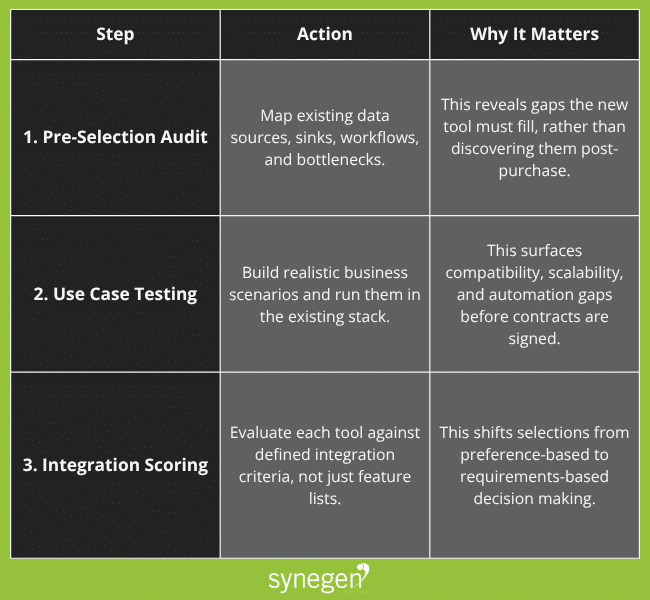
Custom software development can start you off with integration readiness, rather than striving towards it after a purchase. A developer can confirm if certain connections are possible and build bespoke dataflows, syncs, or data transformations.
After all, smarter LMS integrations actually drive business value.
4. Treating the Software Integration Process as a One-Time Launch
Software integration is a living system; it constantly works in the background and requires ongoing maintenance. Organizations that conclude integration efforts at go-live consistently encounter compounding issues.
This is because businesses constantly evolve: processes change, teams restructure, and new data requirements emerge. Without a framework for ongoing ownership, what worked at launch gradually drifts out of alignment with operational needs.
Working with a custom development team injects standardization into your processes. They have the expertise to apply changing guidelines to your connections and troubleshoot issues. This level of support adds an extra layer of protection, ensuring your systems evolve when you do.
How to Establish Uninterrupted Upkeep
Establish an Integration Management Framework
Governance should extend well beyond launch and include change management protocols, version control, monitoring practices, and performance KPIs. Defining these structures early makes it much easier to manage continuous updates.
Tie Success Metrics to Business Outcomes
Connect integration performance to specific operational KPIs, such as faster service resolution or improved order accuracy. This way, performance gaps surface before they affect customers or revenue. You can also drive continuous refinement by building feedback loops between operations and technical teams.
5. Underestimating the Human Side of Software Integration Challenges
Even technically sound integrations fail when users haven’t been equipped to properly adopt them. The outcome is predictable: teams revert to manual processes or build informal workarounds. These are often called “shadow workflows”: processes that operate outside the designated integration system.
Shadow workflows not only undermine ROI, but they also create isolated data silos that erode the cross-system visibility integration was meant to provide.
A custom developer can improve collaboration and insights for everyone who interacts with your integrations. If processes change or technology requirements shift, a developer can keep your team aligned and updated.
How to Address Human Bottlenecks
Involve End Users in Design
User personas and workflow mapping should inform integration design from the start, not after the fact. When users recognize their own processes in the system, adoption barriers drop significantly.
Replace One-Time Training With Ongoing Enablement
Short, role-specific modules delivered within the system interface outperform traditional training sessions, which are often forgotten before users encounter the relevant workflows. Build in real-time feedback mechanisms to identify adoption friction and address it quickly.
Track Behavioral Analytics
Monitoring how users actually interact with integrated systems surfaces adoption roadblocks that surveys miss. When usage patterns diverge from expectations, targeted user interviews can uncover the root cause. This makes it possible to adapt training or system functionality rather than waiting for the problem to escalate.
Mitigate Data Integration Challenges with Solutions That Deliver Long-Term Value
Navigating data integration challenges requires more than technical execution. Cross-functional ownership, well-defined business logic, and continuous attention to user experience are what separate integrations that deliver sustained value from those that stall after go-live.
Synegen has mastered software integration and management for enterprise businesses. With custom-built APIs, data synchronization, and security layers, our clients maximize their technology stacks. They automate tedious processes, send and receive data how they want, and action business insights sooner.
If you want to get the most out of your software, Synegen can help. Book a call with our experts to discover how to turn disconnected systems into scalable, high-performing infrastructure!
System Integration FAQs
1. What are the most common data integration challenges for enterprise organizations?
The most common data integration challenges include misaligned business and technical ownership, failure to distinguish connectivity from automation, poor pre-integration planning, lack of post-launch governance, and low user adoption. Each of these can independently undermine ROI. Plus, they frequently compound when not addressed together.
2. How do you evaluate software integration readiness before selecting a platform?
Start with an integration audit of your existing tech stack: map data sources and destinations, current workflows, and known bottlenecks. These will help identify the gaps a new integration needs to fill. Finally, you should test candidate tools against realistic business scenarios within your existing environment before finalizing a selection. A custom web developer can help you audit your programs and ensure they’re ready for deployment.
3. How long does a typical enterprise software integration process take?
The time can vary considerably. It can take weeks to a year based on the number of systems involved, data complexity, and organizational readiness. Simple point-to-point integrations may take weeks; enterprise-wide software integration projects that span multiple platforms and business units typically run three to twelve months. Organizations that invest in pre-integration planning, governance frameworks, and custom development tend to complete projects faster and with fewer post-launch issues.
Get Insights Sent Straight to Your Inbox
Related Content