When organizations evaluate a learning management system, features usually drive the conversation. Can the platform properly manage courses, certifications, programs, reporting, mobile learning, and extended enterprise features?
These capabilities matter. But there’s another question teams often don’t ask until much later: Does our learning experience actually have to look and behave like the LMS we purchased?
For many off-the-shelf learning platforms, the answer is largely “yes”. Personalization is limited; you can add your logo, adjust colors, configure menus, and make other changes. But the fundamental user experience is shaped by a vendor and their product roadmap.
NCCER Needed More Than an LMS Theme
The National Center for Construction Education and Research (NCCER) serves a workforce that often has to learn where the work is actually happening: on the job site. This reality made a mobile-first experience a priority from the start. NCCER wanted learners to be able to access training easily on their phones without having to navigate a desktop-designed interface.
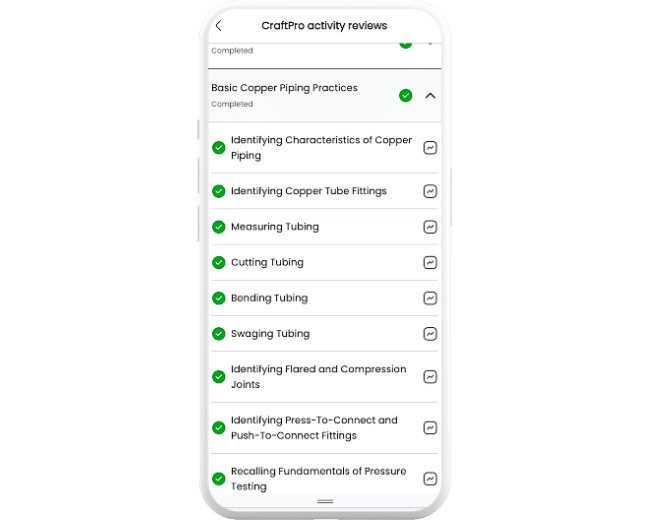
At the same time, NCCER wanted a unique experience; not a generic LMS with a logo attached to it. Their goal was to create a digital learning experience shaped around its users, brand, and business model.
Working with NCCER, Synegen built CraftPro, a custom headless UI/US layer on top of Totara LMS. Totara continues to provide the powerful learning engine behind the scenes, managing courses, programs, users, permissions, completions, credentials, and other enterprise LMS functionalities. CraftPro is the experience layer, giving NCCER control over how experiences are delivered across both mobile and desktop environments.
What does “Headless LMS” Actually Mean?
Headless LMS is a learning environment where the backend and frontend are disconnected, then reconnected via API. This unlocks greater design and experience flexibility, while maintaining the logic that drives the entire platform.
Oftentimes, people assume using a headless LMS means replacing their entire learning platform. In reality, it’s much closer to remodeling a house than rebuilding one.
Imagine you own a home with a solid foundation and framework. Instead of tearing it down and starting over, you redesign the living spaces to better reflect how people live today. The walls, layout, finishes, and user experience change dramatically. But the underlying structure continues to provide the strength and stability that supports everything.
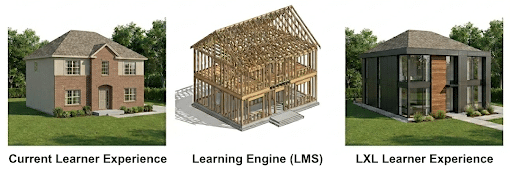
The LMS continues to manage the core learning functionality, data, security, enrollments, and reporting behind the scenes. A separate application delivers a completely customized learning experience that showcases your company’s brand, workflow, and audience.
This way, your LMS works for you, and the learning environments you want, never the other way around. The LMS will always be the powerful foundation working behind-the-scenes, while learning experiences can be purpose-built to suit different needs.
For NCCER’s CraftPro, they now provide a fully custom experience across mobile and desktop instead of simply presenting a standard LMS interface on a smaller screen. Learners interact with an experience designed specifically for the skilled trades, while Totara LMS quietly powers the learning engine underneath.
Configuration vs. True Experience Design
Traditional LMS customization usually happens inside the boundaries established by the vendor. This would include features like “select this theme”, “move these blocks”, “change this menu”, and “create a dashboard”.
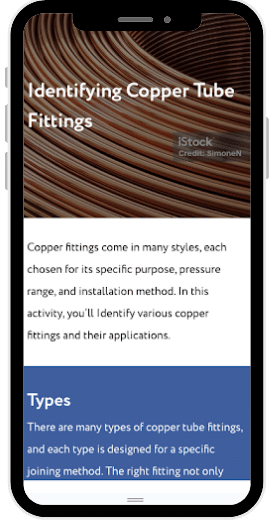
These tools can be useful. But ultimately, you’re still configuring somebody else’s user experience.
A headless architecture changes the conversation, opening the door to learning designed around specific audiences and use cases. For instance, a company could create a streamlined learner portal, a mobile-first learning portal, or another completely branded digital product. This is all attainable while utilizing the platform underneath.
When the user layer is under your control, it can evolve as your users and business needs do.
What About an LXP?
A headless learning environment and a Learning Experience Platform (LXP) are often discussed in similar conversations, but they solve very different problems.
Most commonly, an LXP is a packaged platform designed to improve how learners discover, consume, and engage with content. Features may include personalized learning recommendations, curated content, social learning, skills-based discovery, and content aggregation.
Compared to a traditional LMS, learning is more engaging while operating within the user experience and workflow conventions established by the LXP vendor.
This difference boils down to configuration vs. control. An LXP gives organizations increased options for user, brand, workflow, and business requirements.
For organizations like NCCER, this level of flexibility is particularly significant. Their goal exceeds simply making courses easier to discover, but to create truly meaningful digital experiences for their workforce.
The Best of Both Worlds
Building a completely custom learning system from scratch gives you control, but it also introduces the need to recreate years of LMS functionality: course management, enrollments, completions, permissions, certifications, reporting, integrations, administration, and much more.
While an off-the-shelf LMS comes with these capabilities, a headless approach offers a compelling middle ground: use an LMS for the learning infrastructure, then build the experience your team actually wants on top of it.
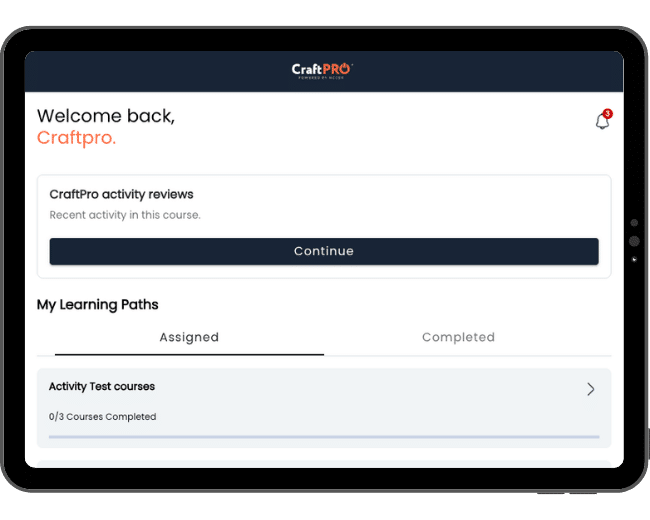
This is exactly what Synegen’s work with NCCER and CraftPro demonstrates. NCCER uses Totara LMS while maintaining a unique learning environment.
Your LMS Should Fit Your Vision
Not every organization needs a headless LMS.
But if you find yourself designing around the limitations of your LMS instead of user needs, it might be time to think differently.
At Synegen, we don’t believe LMS implementation means accepting the boundaries of an out-of-the-box interface. Our combination of LMS expertise, software development, integration experience, and UX development allows us to extend platforms such as Totara far beyond a traditional implementation.
Ready to get started? Contact our team of experts today!